Wednesday, 13 February 2008

I'm Dumping TOAD, Helloooo Oracle SQL Developer!

It's already come around, out of nowhere the price of flowers and greeting cards increases ten fold and that special one starts leaving hints all around the house. Yes, Valentines day, loves is in the air although with a very fake and commercial smell to it. In keeping with the love theme I have decided to announce my separation from TOAD, I have found somebody new, a young new model, little ruff around the edges but with loads of possibilities and the best of all she's much cheaper (Not that kind of cheap...).

I have been looking to move over from TOAD to Oracle's SQL Developer (OSD) since it's initial incarnation as Raptor, but have always found some key feature missing from the product. Recently I have decided to attempt the crossover again, removing TOAD from easy desktop access and focusing on doing all work previously handled by TOAD through OSD. At the start I had to make frequent trips back to TOAD, unable to find certain functions and tools or just getting frustrated with the unfamiliar interface. But as I started using OSD more and more I discovered those familiar TOAD tools in there OSD disguise, and began to appreciate the added functionality provided by OSD. It's not been easy and at first getting the preferences right for your preferred setup may be a little tricky, but once familiar with the new interface and the location of those favourite tools and functions you'll forget about that first love pretty soon.

My Top tips for migrating from TOAD to Oracle SQL Developer
  1. Intentionally or not, Oracle has placed allot of the functions and tools used in TOAD in the same navigation path in OSD, so if your stuck just remember how you accessed it in TOAD and 9 out of 10 you should have the same functionality available.
  2. Save code for later use, highlight the code and right click, select Save Snippet. They can later be retrieved by using menu option View-> Snippets
  3. Search database objects using menu option View -> Find DB Objects

Please feel free to contribute any tips you might have for making the transition a little easier, happy Valentines day.

Tuesday, 3 July 2007

OAF Key Do's and Don'ts (Part 2) - Performance Tuning: "Top 10" OA Framework Development Rules

1) ALWAYS use design time view objects (VOs) rather than dynamic VOs. Dynamic VOs have to be described by BC4J through an additional execute call for the VO prepared statement, and they potentially result in non shareable SQL due to different combinations.

2) ALWAYS set precision for all columns in the VO. This reduces the VO memory footprint. Without a set precision, for example, all String columns default to 4KB in size each.

3) AVOID calling VO.getRowCount to check for existence. getRowCount causes the entire VO row set to be fetched back to middle tier.

4) NEVER call VO.getEstimatedRowCount. getEstimatedRowCount executes select count(*) on the VO. This count is not guaranteed to stay the same, thus the method name.

5) ALWAYS call registerOutParameters with proper precision for callable statements. This reduces the callable statement memory footprint. Without a set precision, for example, all varchar columns default to 32KB.

6) ALWAYS use Oracle-style binding (:1, :2) in your SQL and DO NOT use JDBC style binding (?). This avoids parsing SQL at runtime to do String replacement.

7) AVOID coding generic VOs just to try to reuse them. The "one VO fits all"approach adds complexity to your SQL, increases number of attributes and VO memory footprint.

8) DO NOT execute searches by default nor allow blind queries.

9) Use PNG format not JPEG for BI graph beans.

10) Use JDeveloper to profile your code. JDeveloper 9i has memory, CPU and
event profilers.

Wednesday, 20 June 2007

OAF Key Do's and Don'ts (Part 1) - "Top 10" Golden Rules

I don't know how many of you have come across this in the OAF Devguide, it was only by change that I found it, thought I'd share:

There's a lot to learn when getting started with the OA Framework, but the following list of rules are so universal -- and so fundamental -- they should be familiar to anyone who's doing Framework development.

1) ALWAYS try to declaratively define your UI. Resort to a programmatic layout only if the UI cannot be implemented declaratively. Programmatic layouts are difficult to customize (they don't leverage the Personalization Framework) and may diverge from the UI Guidelines over
time.

2) NEVER change your UI layout properties in processFormRequest(). ALWAYS make changes in processRequest(), even if that means handling an event in processFormRequest() and then redirecting back to the same page. This ensures that the web bean hierarchy is in a stable state when the page renders.

3) NEVER use index numbers to find beans when you want to change their properties. ALWAYS search by name. Index numbers can change during processing.

4) NEVER change the properties of a parent bean from a child bean. This is a poor design practice that hampers reuse while introducing fragile code (particularly if the child code executes too late in the page rendering cycle to properly affect the parent).

5) NEVER instantiate Beans using "new OA*Bean()". ALWAYS use the createWebBean() factory methods available on the OAControllerImpl class. Not all Bean properties are initialized correctly when you use "new."

6) NEVER create Form Beans in code (this means NEVER add nested Form beans to a page; your Page Layout region should be the only form region). Multiple form Beans on a page are not supported and can result in strange runtime behaviors.

7) NEVER count on your Application Module using the same database connection in subsequent requests. For example, NEVER post and commit in separate requests. For performance reasons, the Framework will start pooling and reusing connections in 5.7 instead of holding onto a single connection throughout the life of an Application Module.

8) NEVER use JDBC directly unless you're calling a PL/SQL routine (you should use a view object instead, and if possible, the view object should be defined declaratively and not programmatically).

9) NEVER add member variables UNLESS THEY ARE TRANSIENT OR FINAL to view objects, Controllers, entity object, view rows and Application Modules.

10) ALWAYS adhere to the Self-Service Performance Guidelines

Monday, 26 March 2007

Call PL/SQL from OAF

In many situations developers need to execute PL/SQL code from there OAF application, be it legacy code or complex database manipulation better suited for PL/SQL.

The following example calls a PL/SQL procedure, passing in and receiving back parameter values. To ensure we athere to the MVC architecture, you must execute this code from your Application Module (AM). The method returns a HashMap object containing the two return values from the procedure, the HashMap can be returned to your controller, and used to raise a message for the user.

The following code is placed in your region or page controller, to call the method from your AM:

// Invoke the method
HashMap returnValues = (HashMap) am.invokeMethod(
"executePlsql");

// Get the returned values from the method
String status = (String) returnValues.get("Status");
String message = (String) returnValues.get("Message");

if (!status.equals("SUCCESS"))
{
am.invokeMethod("rollback");

// ERRORS from executePlsql
MessageToken[] tokens =
{
new MessageToken("STATUS", status),
new MessageToken("MESSAGE", message),
};

OAException errorMessage = new OAException("XX",
"XX_PLSQL_ERR", tokens,
OAException.ERROR, null);

pageContext.putDialogMessage(errorMessage);

The method to call your PL/SQL code, created in your page or regions AM:


import com.sun.java.util.collections.HashMap;
import java.sql.CallableStatement;
import java.sql.SQLException;
import java.sql.Types;

public HashMap executePlsql(String objectId, String objectSubType)
{
CallableStatement st = null;
HashMap returnValues = new HashMap(2);

try
{
String stmt = "BEGIN xx_pkg.xx_procedure( " +
"p_object_id => :1, " +

"p_object_sub_type => :2, " +
"p_status => :3, " +

"p_message => :4); END;";

OADBTransaction tr = getOADBTransaction();

st = tr.createCallableStatement(stmt, 1);


// Bind the input parameters
st.setInt(1, Integer.parseInt(objectId));
st.setString(2, objectSubType);


// Register return variables
st.registerOutParameter(3, Types.VARCHAR);
st.registerOutParameter(4, Types.VARCHAR);

st.execute();

// Assign returned values to variables
String status = st.getString(3);
String message = st.getString(4);

st.close();

// Populate HashMap with return variables
returnValues.put("Status", status);
returnValues.put("Message", message);

OAExceptionUtils.checkErrors(tr);
}
catch (SQLException sqle)
{
throw OAException.wrapperException(sqle);
}

return returnValues;
}

OAF White Paper

I recently presented a white paper at the 2006 South African Oracle User Group, an introduction to OAF development called: Oracle Applications Development Framework - The New Frontier

I hope this will help new comer's to get a good introduction to OAF development, extension and personalization. If there are any questions related to the white paper, please drop me a comment and I will reply a.s.a.p.

Please leave me a comment with your e-mail address and will get the document to you.

Thursday, 15 March 2007

UK hear I come

First and foremost I would like to apologise for not updating the blog for the past couple of month's, come to think of it, it's my first blog for 2007.

Apart from being extremely busy building a custom bolt-on OAF application for a large multinational, I have been applying to work in the United Kingdom under the government's Highly Skilled Migrant Program (HSMP).

Well I have been accepted and am currently looking for some work before I arrive in the UK on the 1st of May, so any help would be highly appreciated ;-). I am also in the process of creating a new blog to detail my experiences living, working and playing in the UK, so check back soon for a link.

If there are any particular areas of the OAF you would like me to explore more, please drop me a comment and I will consider doing a post.

Tuesday, 28 November 2006

Raise a Business Event from your OAF Page

After quite a while of inactivity, due partly to a frantic schedule and the addition of a new obsession in the form of my new mountain bike, I am back on the horse and very excited to start blogging again. A Big thanks to Steven Chan for profiling the Oracle EBD Developer on his blog, just the kick I needed to get going again.

I recently had the opportunity to present the 11i/2.6 Implement Oracle Workflow course at Oracle South Africa, which turned me onto business events in a big way. Now I have previously blogged about launching an Oracle Workflow process from an OAF page using the oracle.apps.fnd.framework.webui.OANavigation class. In this post I would like to demonstrate how we can raise a business event through the Oracle Business Event System (OBES), which enables you to utilize the extensive functionality of the OBES to launch workflow processes and perform a number of diverse actions.

import oracle.apps.fnd.wf.bes.BusinessEvent;
import oracle.apps.fnd.wf.bes.BusinessEventException;
....
...
..
public void processFormRequest(OAPageContext pageContext, OAWebBean webBean)
{
super.processFormRequest(pageContext, webBean);

if (pageContext.getParameter("Submit") != null)
{
// Get Transaction
OAApplicationModule am = pageContext.getApplicationModule(webBean);
OADBTransactionImpl oadbTrx = (OADBTransactionImpl) am.getOADBTransaction();

// Create BE Object
String eventName = "companyabc.oracle.apps.xx.event.createrequest";
String eventKey = "1001-1";

BusinessEvent busEvent = new BusinessEvent(eventName, eventKey);

try
{
// Set Event Property
busEvent.setStringProperty("XX_TRX_TYPE", "NEW_REQUEST");

// Raise Event
busEvent.raise(oadbTrx.getAppsContext().getJDBCConnection());
}
catch (BusinessEventException exception)
{
// Set Message Tokens
MessageToken[] tokens =
{ new MessageToken("EVENT_EXCEPTION",
exception.toString())
};

OAException eventErrorMessage = new OAException("XX",
"XX_RAISE_EVENT_ERROR", tokens);

oadbTrx.rollback();
....
...
..
}

oadbTrx.commit();
....
...
..
}
}
}

Wednesday, 23 August 2006

Personalization and the MDS Database Repository

All declarative User Interface components are stored either in XML files, in a format defined by MDS (Meta Data Services) Schemas, or in the MDS repository tables. When a personalization is created through the OA Personalization Framework it is added on top of the base product meta data. The personalization does not overwrite the existing base product UI and are therefore preserved during upgrades and patches. The MDS repository is supported by the JDR_UTILS PL/SQL package, used to query and maintain the repository:

SQL> set serveroutput on
SQL>
begin
jdr_utils.listcustomizations
('/oracle/apps/icx/por/req/webui/ShoppingCartPG');
end;
/
/oracle/apps/icx/por/req/webui/customizations/site/0/ShoppingCartPG
/oracle/apps/icx/por/req/webui/customizations/org/44/ShoppingCartPG

PL/SQL procedure successfully completed.
SQL>

The MDS database repository consists out of four tables:
  • JDR_PATHS: Stores documents, packages and there parent child relationship.
  • JDR_COMPONENTS – Stores document components.
  • JDR_ATTRIBUTES – Stores attributes of document components.
  • JDR_ATTRIBUTES_TRANS – Stores translated attribute values of document components.

Thursday, 10 August 2006

SAOUG Conference 2006

Just got some good news, I have been accepted as a speaker at the South African Oracle User Group Conference 2006. I will be presenting my paper - "Oracle Applications Framework Development - The New Frontier", which is an introduction to the world of OAF development, personalization and extension. My presentation will be a 45 minute session scheduled for 9:55 AM Wednesday 27 September, so don’t miss it.

The conference is held at Sun City and runs from the 25th to the 27th of September, if you are interested in attending visit the SAOUG website at: http://www.saoug.co.za


Wednesday, 26 July 2006

Oracle Workflow Notifications & OAF

If you wanted to display HTML formatted content in an Oracle Workflow Notifications before the release of FWK.H you had to use one of the following options:

  • PLSQL Documents - 32K size limit
  • PLSQLCLOB Documents – CLOB

PL/SQL development of HTML notifications that contains tables and complex layouts can be difficult and very time consuming. It requires the developer to have a very good knowledge of HTML and makes the implementation of a standard “look and feel” very difficult.

With the implementation of FWK.H we are able to leverage the power of the OAF to create multifaceted Workflow notifications. Also called JRAD notifications, FWK embedded regions is nothing more then a normal OAF region displayed in the body of a Oracle Workflow notification.

Incorporating an embedded FWK region in a Workflow notification consists of the following steps:

  1. Create an OA Component Region containing the Headers, items and tables you want to display in the body of you notification. Developing and implementing this region is done in the exact same way you would when creating a region for an OAF custom page. Remember to create a dedicated Application Module (AM) for your region that will contain all the View Object (VO) required for your layout.
  2. In core applications, create a SSWA jsp function where the WEB HTML call is: OA.jsp?page=/companyabc/oracle/apps/xx/module /webui/XxRegionNameRN
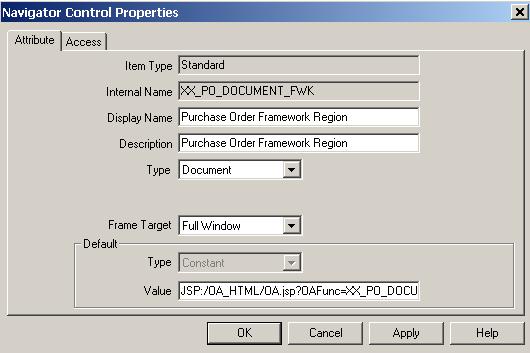
  3. Create a new Workflow attribute:
WorkFlowAttribute

Value: JSP:/OA_HTML/OA.jsp?OAFunc=XX_PO_DOCUMENT_RN_NTFN &poHeaderId=-&PO_HEADER_ID-

XX_PO_DOCUMENT_RN_NTFN is the custom function created in core apps and &PO_HEADER_ID is a workflow attribute I am passing back as a parameter to the region's controller to initialize my VO.

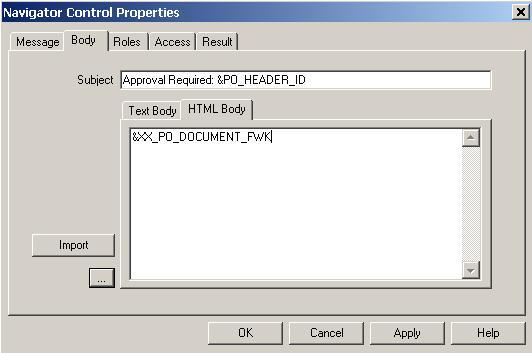
4. Add the new attribute to your message:

WorkFlowAttribute

Save your workflow and initialize a new instance, the notification body should now be populated by the OAF region. No messy HTML coding, quick, easy and you can reuse the region in your OAF custom pages.


Tuesday, 18 July 2006

OAF and Oracle Workflow

Most of the custom development work I have done on OAF has required me to interact with Oracle Workflow, specifically to handle approvals and interfaces. The class oracle.apps.fnd.framework.webui.OANavigation provides Java wrappers for Oracle Workflow Engine's PL/SQL APIs.

The class is actually intended for use when creating and managing OA Framework Page Flows that are defined by Oracle Workflow, but can also be used to interface with Oracle eBS Workflows.

Example Code - Launching a custom Oracle eBS Workflow from a OAF page:

import oracle.apps.fnd.framework.webui.OANavigation;
import java.math.BigDecimal;

public void launchCustomWorkFlow(OAPageContext pageContext)
{
String wfItemType = "CUSTOM";
String wfProcess = "CUSTOM_PROCESS";
String wfItemKey = "1001-1";

OANavigation wfClass = new OANavigation();

// Create Workflow Process
wfClass.createProcess(pageContext, wfItemType, wfProcess, wfItemKey);

// Set Number Attribute: ITEM_INTERFACE_ID
wfClass.setItemAttrNumber(
pageContext,
wfItemType,
wfItemKey,
"ITEM_INTERFACE_ID",
new BigDecimal(1));

// Set Text Attribute:
ITEM_NAME
wfClass.setItemAttrText(pageContext, wfItemType, wfItemKey,
"ITEM_NAME", "ITEM1");

// Start Workflow Process
wfClass.startProcess(pageContext, wfItemType, wfProcess, wfItemKey);
}

Tuesday, 11 July 2006

Getting started with OAF development

I have recently received a number of queries related to OAF development, particularly regarding the quickest way to get started. I will handle these questions in a two part post, in the first I will aim to provide you with the basic software and documentation requirements to get started. In the second post we will have a look at a couple of common OAF extension tasks.

OAF development can be split into two major categories namely:

  • Personalization refers to the ability to declaratively alter the UI to suit user or business needs.
  • Extensibility refers to the ability to programmatically extend an application's functionality.

Personalization is the quickest and easiest way of altering the OAF UI, changes are protected from future upgrades and most personalization tasks can be performed by functional consultants or even trained users. If you have any requirement to alter the OAF UI, personalization should be your first stop. The following document will be of great help in understanding and implementing OAF personalization:

Metalink Doc ID: 236618.1 - OA Framework Personalization and Extensibility Guide: Version 5.7+

Extensibility is used when you are required to implement changes to functionality not provided by personalization, or when you are required to develop add-on/new functionality to the OAF UI.

The following steps will get you up to speed with the correct software and documentation:

  • Follow post: Find the right JDeveloper Patch for OAF development, once you determine the correct JDeveloper version for your development environment you can proceed to download the JDev patch from Metalink.
  • Once downloaded, follow the installation step set out in the OAEXT_README.txt document, located in the root directory of the patch file.
  • Oracle included excellent documentation with the JDeveloper patch, after installation you can locate the documentation index here: JDEV_INSTALL_DIR/jdevdoc/index.htm
  • Follow “You are Customer, Consultant or Support Representative” in Chapter 1: Setting Up your Development Environment of the OA Framework developers guide, make sure you complete all setup steps successfully.

Congratulations you have successfully installed and configured your new development tool, now it’s time to get into the documentation. I suggest you complete Chapter 1, 2 and 3 of the OA Framework developers guide.

You can then proceed with the Oracle Applications Framework ToolBox Tutorial, it is an excellent step by step introduction to OAF development and extension, and will introduce you to all the key concepts required for OAF customization.

Keep tuned for part 2: Include a new column - Extending a standard LOV view object.

Thursday, 29 June 2006

OAF - Tables and PPR

It has just taken me two days to implement PPR on a table, yes 2. I might be a little slow but the developers guide was of very little help and I was unable to find any worthwhile examples.

When planning to implement PPR in tables it is very important to decide early on what type of PPR you want to implement. Let’s take a step back, when implementing PPR on normal fields outside a table, there is only one instance of each field to modify. But when working in a table there might exist an infinite amount of rows each with an instance of the specific field.

If functionality requires that all instances of the PPR field behaves in the same fashion, PPR using SPEL bindings will work perfectly, and is very quick and easy to implement. On the other hand if you require each instance of the PPR field to act independently based on another value in its table row, you will have to look at Bound Values or Content Switcher.

In this post I will focus on Bound Values as this is the solution I implemented, the Dev guide specifies the following consideration when having to decide which solution to use:

“You should limit your use of Switchers to within tables, particularly when you want to switch between different kinds of web beans, such as a poplist or a checkbox. When you have only one type of web bean, but the value of an attribute on that web bean varies at runtime, then you should implement that attribute as a bound value rather than as a Switcher.”

PPR using Bound Values:
  • Add a transient attribute to your table view object; you will bind this attribute to the value of the PPR column’s RENDERED attribute.
  • Modify the transient attribute getter method to change the value depending on your PPR requirement. In my case I needed to render the Supplier Name field based on the value of the SupplierYn attribute in the table view object:

public Boolean getSupplierNameRendered()
{
String yn = getSupplierYn();
Boolean tf = Boolean.TRUE;

if ("Y".equals(yn))
{
tf = Boolean.TRUE;
}
else if ("N".equals(yn))
{
tf = Boolean.FALSE;
}

return (Boolean) tf;
}
  • Now bind the Supplier Name attribute to the transient attribute in the page controller’s processRequest method:
OAMessageLovInputBean supplierNameBean = (OAMessageLovInputBean) webBean.findIndexedChildRecursive(
"SupplierName");

supplierNameBean.setAttributeValue(
RENDERED_ATTR,
new OADataBoundValueViewObject(supplierNameBean,
"SupplierNameRendered", "SupplierVO1",
false));
  • The rendering of my attribute was based on the value of the attribute “SupplierYn” in the view object; to enable the updating change “Action Type” attribute to “fireAction”:

There it is four easy steps to enable PPR on a table.

Thursday, 22 June 2006

Viva le Resistance, Viva Mozilla!

Many of us are content to use IE for all our browser needs, but few know that there is an alternative. Mozilla Firefox is a open-source browser that some ten percent of the web uses, and which has been certified for use with Oracle EBS 11i.

I have been using Firefox for just more then a year, it is a very stable and well tested product that can be installed and immediately used as your main browser. There is also a number of plugin’s and extensions, Eddie Awad created a very useful plugin that allows you to search Metalink and Oracle Docs direct from your browser.

So, help stem the tide, go ahead, check it out.

Monday, 19 June 2006

Find the right JDeveloper Patch for OAF development

I have read a number of questions regarding what JDeveloper version should be used for OAF development. After a recent upgrade of our development system from 11.5.9 to 11.5.10 CU2, I did some research on Metalink and found the following info regarding JDeveloper versions:

Current JDeveloper patches:

  1. Patch 4045639 - 9IJDEVELOPER WITH OA EXTENSION ARU FOR FWK.H
  2. Patch 4141787 - 9IJDEVELOPER WITH OA EXTENSION ARU FOR CU1
  3. Patch 4573517 - Oracle9i JDeveloper with OA Extension for 11.5.10 CU2
  4. Patch 4725670 - 9IJDEVELOPER WITH OA EXTENSION ARU FOR 11i10 RUP3

To determine which patch to use, you can simply check the framework version in your instance by using http://host:port/OA_HTML/OAInfo.jsp, then choose the matched one.

11.5.10K = patch 4045639
11.5.101CU = patch 4141787
11.5.102CU = patch 4573517
11.5.103CU = patch 4725670

It would be interesting to have a survey regarding what framework versions are being used for OAF development. Please post your current development version in a comment; I will publish the results at a later stage.

Checkout Metalink note 416708.1 for the up to date list of OAF releases.

Blogging

The main aim of this Blog is to share my experiences as an Oracle e-Business Suite (EBS) developer. I will also from time to time blog about any subject that made me laugh, cry, angry or I feel would be of interest.

Just to get everybody thinking here is a short list of EBS topics I will be covering:

  • Oracle Application Framework Development, Extension and Personalization
  • Database Performance (Development Specific)
  • SQL & PL/SQL Concurrent Development
  • Open Interfaces and API's
  • Forms, Reports, CUSTOM Library development and customization
  • Workflow Development and Customization
  • Development Tools (JDev, Forms, Reports, TOAD, etc.)

All comments, anonymous or otherwise, fully appreciated.